


Our Mission…
…to be the low-cost leader in both automated and remote data recovery services worldwide.
Consultation and case evaluation are always free. Complex cases welcome!
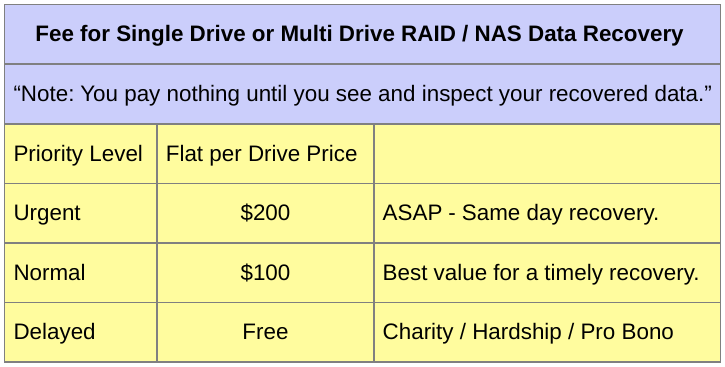
Enjoy flat no surprises pricing. Save over %50 compared to other recovery providers.
After battling some health issues I am happy to report I am back and accepting new recovery cases as of May, 2022.
Searching for data recovery help? Let an experienced technical professional work on your case. Delivering data recovery expertise remotely over the Internet is my specialty. Since 2011 I’ve worked on hundreds of cases for clients world-wide operating on both single drives and multi-drive RAID / NAS systems. It’s safe. It’s fast. And of the highest quality recovering the original file names, folder structure, and time stamps.
To begin the recovery process e-mail: FreeDataRecovery.us@gmail.com or open a chat session or call / text message: 617 506 9392
My name is Stephen Haran and I’m an On-Line Data Recovery Consultant. My remote data recovery process is a very powerful method to quickly deliver both data recovery software and expertise directly to you in your home or office. This combination (data recovery software + data recovery expertise + remote access via Internet) allows me to perform data recovery operations, efficiently and economically, anywhere in the world on a range of storage devices.
Looking for a Do-It-Yourself NAS data recovery solution? Check out NASmatic it’s a fully automated NAS recovery tool. It is designed to recover data from failed NAS devices or other devices that use Linux Software RAID (mdadm). To use just boot NASmatic on a PC with your RAID drives attached. Read the Quick Start Guide. Or click here to download the NASmatic iso file, size 731MB… NASmatic-2019CC.iso.
Additional Details…
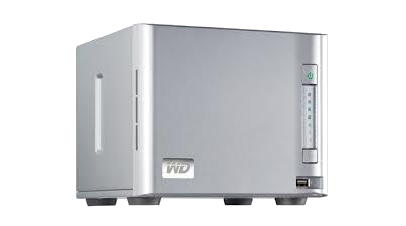
NAS data recovery is an ideal example to showcase the value of my remote data recovery service. Often it is possible to recover your data in hours and at a fraction of the fee other providers charge. I specialize in Western Digital ShareSpace NAS data recovery but also operate on NAS devices from other vendors such as the Buffalo Terastation, Seagate BlackArmor, Dell PowerEdge (PERC), HP Proliant (Smart Array), Netgear ReadyNAS, Lacie, Iomega, QNAP, Synology, Thecus etc., and also Apple Mac RAID, Intel Matrix RAID, Microsoft Windows RAID, and Linux Software RAID.
Of course laptop hard drives, desktop computer hard drives, and external USB drives are also good candidates for on-line data recovery.
No one can portray the value my data recovery service provides better than the clients I’ve already assisted. So if you are skeptical please take a moment and read some of the comments my past clients have written. See the comment section on the right side of this page or click here. I think you’ll be impressed with what they have to say.
Is an online data recovery service right for you? Well most, but not all, failure scenarios will qualify for my service. So read below for all the details. And when you are ready to proceed contact me and we can start the process of recovering your data right away.
Note: For those with security concerns inquire about our do-it-yourself data recovery coaching service.
Contact / Download Info…
My name is Stephen Haran. Send me an email and I will reply with the link to download my recovery CD. Please also include a brief description of your case. My email address is:
Stephen@FreeDataRecovery.us
Or contact me by phone at my Boston USA location. Call or send a text message:
617 506 9392
What I do (and no one else does it this way)…
• Briefly stated, I perform remote data recovery operations to save the data on your internal hard drive, external USB drive, RAID array or NAS box such as Western Digital ShareSpace, Lacie, Synology, Seagate BlackArmor etc.
• This is done by connecting to your computer over your existing high speed Internet service.
• Which means I can attempt data recovery on any computer no matter where it may be located anywhere in the world.
• I specialize in drives that suffer from so called “logical” failures ie. bad sectors, lost partitions, raw drives, accidental formatting, RAID crash, etc.
• Note, unlike other remote recovery services, it is not necessary for your computer to start up into Microsoft Windows, MacOS, or Linux.
• There’s no need to extract, package, and risk further damage by shipping out your damaged hard drive.
How it’s done….
• You contact me and I give you the link to download the image file used to create my bootable data recovery CD or USB flash drive.
• After downloading is complete you burn the image file onto USB or blank CDROM disc.
• You then connect the newly created USB or CDROM disc to your computer and boot up.
• Sit back and relax there’s nothing else you need to do. I handle the rest.
• A temporary data recovery software environment automatically loads on your computer.
• Then a secure encrypted link is automatically created from your computer to my computer here at my Boston office.
• Now I am able to connect remotely to your computer and begin the data recovery process.
Requirements….
• Your failing hard drive(s) must receive power, spin up, and be detected. (If no power removing TVS diodes may restore power, contact me to learn more.)
• Your laptop or desktop computer is connected to the Internet by a network cable. Wireless connections are possible but cable is easier.
• Plan to provide free space somewhere (local or network) to store the recovered data.
Limitations….
• Physically damaged drives can not be repaired using this technique, eg. shock/flood/fire.
• Drives making repetitive, non-random, clicking noises will require physical data recovery. Contact me for a referral.
F.A.Q….
Q1. I’m skeptical. It sounds too good to be true. What’s the catch?
A1. There is no catch. My remote data recovery service combines existing proven technologies along with years of experience to make this unique service possible. Winning over the skeptics is perhaps my biggest challenge. See my statement about trust.
Q2. Is my data safe? Do you copy my data over the Internet?
A2. Your data is never copied over the Internet. If needed your data is copied to storage you provide locally at your site. Keeping your data secure is a top priority.
Q3. Then what data does travel over the Internet?
A3. Very little, only the keystrokes needed to operate recovery software programs are transferred over the Internet. And even this data travels over a secure encrypted link.
Q4. Can you also recover data from an external USB drive?
A4. Yes. This technique will also work on USB drives. But in some cases you may need to extract the drive from the USB enclosure and directly attach it to your computer.
Q5. Is your Free Data Recovery service really free? How is it possible?
A5. The first two gigabytes of data are recovered for free. But if you are in a hardship situation then plead your case for more free data. Since this is a remote data recovery service there is very little overhead. Plus the software tools used are all custom made or provided free from the Open Source software community. So it’s possible to provide this service at a relatively low cost.
Q6. How “fast” is fast?
A6. RAID / NAS recovery can often be performed in a matter of hours. Single drive recovery will vary depending on the size and extent of the damage to your hard drive. In one recent case, a 320GB drive suffering from bad sectors, it took 24 hours to perform a full recovery. Once connected to your system and the recovery process begins a more accurate time estimate can be provided.
Q7. I’m computer savvy. Will you help me do my own data recovery?
A7. Yes there is a do-it-yourself data recovery option.
Q8. You seem to know Linux very well do you also offer Linux consultation services to assist with general Linux problems?
A8. Yes Linux consultation is also offered using online meeting/screen view software, and not just Linux, Windows as well.
About me….
I have over 20 years of computer industry experience performing both Microsoft Windows and Linux systems administration. Over the years I’ve focused on methods of applying Linux and free Open Source technologies to aid in the management and repair of Windows computers. For more about me see my LinkedIn profile.
Again my name is Stephen and I welcome your questions or comments. Please feel free to contact me via email with any inquiries regarding this service. My email address is: Stephen@FreeDataRecovery.us
To those interested in my remote access technology….
One of the things that makes Free Data Recovery so unique is my boot CD/USB method of connecting to remote computers. Imagine being able to remotely connect to any computer anywhere in the world by having a person on the remote end simply boot up from your CD/USB. It’s quite amazing to see it in action and as far as I know no one else performs remote computer access this way. It’s super quick and super easy. Currently I only use the software environment on the CD/USB to perform data recovery but you can also perform an array of additional systems administration tasks with it. So if you are an IT pro and manage computer systems from far away and you would like a custom version of this CD/USB created just for you then I welcome you to contact me and discuss the possibilities.

Recent Comments